Ten Quick Impressions of Sprint’s Samsung Epic 4G

Sprint’s latest 4G-enabled phone, the Samsung Epic, landed on my doorstep today. I’ll be putting it through its paces for an upcoming review, but here are some initial first impressions. Also, if there’s anything in particular you’d like me to check out for the review, let me know in the comments section.

1. It’s not as big as I thought. It’s got a nice 4-inch screen and a full QWERTY keyboard but it isn’t nearly as thick as I though it’d be. That’s likely thanks to the Super AMOLED screen that Samsung uses, which is thinner than traditional LCD screens.

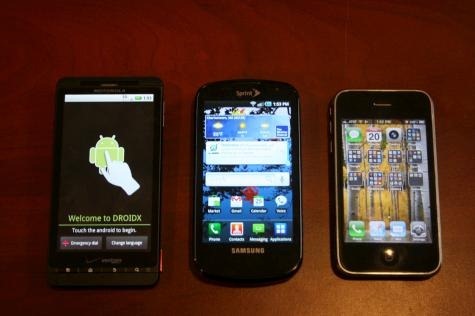
Here’s a size comparison against a Droid X (left) and an iPhone 3GS (right).
IMG_1578

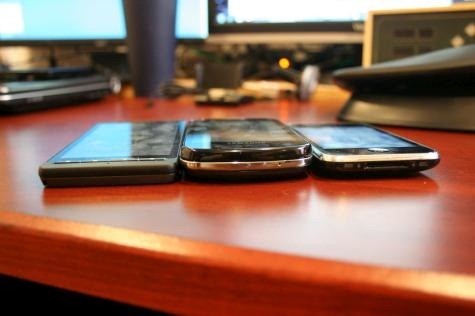
And a thickness comparison.

IMG_1594

2. I like the screen. It’s super bright and responsive, and everything looks great on it so far. Samsung’s done a nice job here.

3. Sprint’s 4G network seems to be quietly operational here in Boston already, though it’s not officially due until later this year. I’m able to connect to it in short spurts but it’s a super weak signal where I live, so an initial 4G speed test resulted in just 559 kbps down, and 156 kbps up. As a comparison, a 3G speed test with full bars resulted in 1135 kbps down and 154 kbps up. I’ll test it out in other parts of the city to see if I can get some real-world speed tests with a solid 4G connection.

4. The interface itself is impressively snappy. It’s one of the best Android-based phones I’ve used so far—definitely closing the gap on the iPhone.

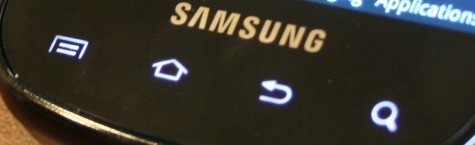
5. I don’t like the touch-sensitive Menu, Home, Back, and Search buttons at the bottom of the screen. I wish they were actual buttons. They disappear after about five seconds of use and must be re-tapped to get them to light up again. It also means that the only way to wake the phone up after the screen turns off is with the power button, which is awkwardly located in the upper right hand corner of the phone underneath the band separating the screen from the keyboard.
IMG_1602

6. The keyboard is a little mushy. I forgot how much faster actual hardware keyboards are, but this one’s keys don’t have much downward travel and the space bar is really small. I’ll keep playing around with it, though.

7. Samsung’s custom TouchWhiz interface seems okay so far. It pretties up Android a bit and makes it more accessible to novice users but takes some getting used to if you’ve used the standard Android interface before. The applications section looks very Apple-like.

8. The USB charging port is on the top of the phone and covered by a sliding slot. It’s unique and offers extra protection, but it’s a bit cumbersome to open when you want to charge the phone or connect it to your computer.

9. The phone feels relatively solid but not pretentious. It’s understated. The entire top is glass, then there’s a chrome band around the middle, and the back seems like a pretty standard dark gray hard plastic. The screen slides up with a satisfying thump but doesn’t feel like it’s going to wear out the hinge. All in all, it seems like the phone will be able to withstand daily bumps and bruises but I’d be nervous about dropping it from too high up.

10. I’m a little worried about the voice quality so far, but I need to test it a lot more. As it stands, though, I had to re-record my name and voicemail message about a dozen times each because most of the recordings would sound kind of muffled at first and then thin out into a more tinny sound—to the point that I couldn’t even understand what was being said. That may have had something to do with Sprint’s voicemail system, so I’ll keep testing with actual phone calls to actual people.

That’s about it for now. If you have any specific questions or features you want me to check out, let me know in the comments section below.

More on Techland:

Sprint Announces Pricing, Availability For Samsung Epic 4G

Android: Samsung Epic 4G to Sprint, Vibrant to T-Mobile, Fascinate to Verizon

Samsung Launches Impressive ‘Galaxy S’ Smartphone

Related Topics: 4G, Epic 4G, galaxy s, Gadgets, Samsung, Smartphones, Sprint
  • joel0917

    i have been a sprint customer for 14 years. now i have a Blackberry adn can’t wait to dump it. Tempted to switch to Iphone..but the keyboard in this phone interests me. My question or two is..so if i set the phone down for an hour..i have to hit the power button to get it back to life? i can’t touch the screen? Also how is the pinch and zoom feature…is it similiar to iphone? i can switch to iphone or go with this phone…

  • jimbohara

    Thank you for the post.

    I would appreciate your impressions of:

    - wifi tethering and the effect on battery life
    - Battery life in general
    - Front facing video camera and compatibility calling iphone4 Facetime with Fring on 4G/3G/wifi
    - multi-axis sensors – usable by any apps? Marketing hype?
    - Sprint apps loaded – anything of note?
    - Continued thoughts on keyboard – are you using it on the onscreen keyboard?
    - Notifications – Can you hear the tones in the holster or in your pocket
    - Issues with it unlocking while in holster/pocket
    - Any bluetooth impression if you have the gear to test it

    Thank you!

    -Jimbo

  • dschrute

    I’ve been using this phone for about a week, and here are my impressions, @jimbohara:

    I would appreciate your impressions of:

    - wifi tethering and the effect on battery life (about what you’d expect. i’ve only used it on 3G tethering, however, so 4G might drain a little more)

    - Battery life in general (better than I expected. lasts an entire day, but will need to be charged by the evening if you use it normally. i start around 7 am and usually have it on a charger by 7PM. still better than my Palm Pre)
    - Front facing video camera and compatibility calling iphone4 Facetime with Fring on 4G/3G/wifi (front-facing camera is decent, the Fring client needs work. i’m really waiting for integrated handset-to-pc video chat!)
    - multi-axis sensors – usable by any apps? Marketing hype? (quickest response of any multiaxis gyro i’ve seen yet.)
    - Sprint apps loaded – anything of note? (usual bloatware like NFL and NASCAR, Sprint Nav, TV, and “Zone”. Also a demo of Asphalt 5, the Amazon MP3 store, and qik. Not too much bloat overall, but nothing all that usable, either)
    - Continued thoughts on keyboard – are you using it on the onscreen keyboard? (i’ve stopped using the physical keyboard at all. since the processor handles things so quickly, typing on the stock Android virtual is really, really smooth. I don’t think this needs a physical at all, but I understand why it’s there.)
    - Notifications – Can you hear the tones in the holster or in your pocket (not only can i hear them all, the vibration is very strong. everything comes through, even with the stock settings)
    - Issues with it unlocking while in holster/pocket (none- the power button only turns on the screen. after that, you still have to slide a blue circle up to the top of the screen to actually unlock it. this prevents any accidental dialing)
    - Any bluetooth impression if you have the gear to test it (i’ve connected with my PC, my Mac, and wireless stereo BT headphones. I’ve done OBEX with Blackberries, including large files. Honestly, BT3.0 isn’t really all that different from earlier versions)

    Overall, tho, this phone is fantastic. I’d highly recommend it, even if you’re not in a 4G area (as I am, in Detroit).

  • phito11

    I would love to see an Epic Evo comparison.
    Being the two top phones in the Sprint line up, and both running Android, I’m still not sure which one I should go with. I love the screen size of the Evo, but is it as good as the Epic’s? Also which one has the better picture/video quality?

blog comments powered by Disqus