Logitech Revue with Google TV Review: A Bridge to the Future

I’m bullish on Google TV. Bullish. Well, bullish on the concept of Google TV and how it integrates with the current way most people consume television and the way we’ll all consume television in the future. Whether Google TV as a platform ultimately succeeds or fails doesn’t matter as much as the method with which Google has fused TV and the web together. It sets a standard that potential competitors should closely emulate with future products.

Setup

Google TV is not like Apple TV or Boxee or Roku or any of those boxes that connect to your television set. It does some of the same things that those boxes do, but it does a whole lot more.

The standard internet-connected TV box connects to an auxiliary input on your TV and exists separately from however you normally watch TV—TiVo, your cable company’s DVR, over-the-air, etc. Your cable box, for instance, connects to the primary input on your TV and when you want to watch something on your Apple TV, you switch to input two.

Google TV is a primary input device. It sits between your cable box and your television set and acts as a layer over the top of however you normally watch TV. This is crucially important and is the fundamental difference between Google TV and everything else that’s out there. Everything.
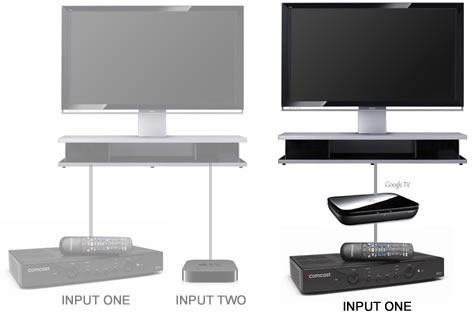
diagram

So in my case, Comcast goes into the back of my TiVo box, the HDMI output from my TiVo box goes into the HDMI input on the Logitech Revue, and then the HDMI output on the Logitech Revue goes into the HDMI input on my TV.
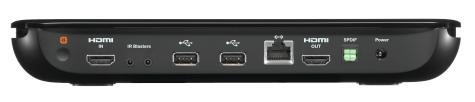
Revue_BOX_Input_300_dpi

The end result is a TiVo interface that works just like it normally does and, when I want it, a Google TV interface that I can bring up over the top of TiVo when I want to do something more advanced than TiVo offers.

You could literally hook Google TV up in your house and nobody would notice that it’s there. That makes it a great option for households where some people just want to watch TV and other people want to be able to stream Netflix, watch YouTube videos, or surf the web on the big screen.

Related Topics: google tv, internet, logitech, logitech revue, reviews, Revue, Gadgets, Google, Home Entertainment, Reviews
  • njronbo

    The only…only problem with the video posted on this site….

    Doug shows us that he has a TIVO DVR and that he can Tivo
    shows on his Google TV if he wishes to.

    That’s great if he has a Tivo DVR with Dish Network.

    Any other DVR on any other network is not compatible.

    Otherwise, great review. I want one of these.

  • njronbo

    Bad news for Google TV:

    http://www.pcmag.com/article2/0,2817,2371266,00.asp

    Doesn’t look like a good buy after all.

  • http://www.aamoth.com/ Doug Aamoth

    I have a TiVo box and Comcast service (using a CableCard). I can record currently-playing shows using the Google TV interface, but scheduling future recordings has to be done directly through the TiVo interface. The Dish/Google TV box that’s coming out soon lets you schedule recordings directly through the Google TV interface.

    If I press the star/record button on the Google TV keyboard, it pops up a menu asking if I want to bookmark the channel or record the program. If I bookmark it, the channel gets added to the Bookmarks section in the Google TV menu. If I choose record, Google TV hands off the recording function to the TiVo box. Since the keyboard is a universal remote, it treats the record option the same as pressing the record button on the TiVo remote.

    As for that article you linked, yes, that’s not good at all. I’ll be doing a piece on that today.

  • http://smc62.wordpress.com/ smc62

    Doug,

    Does the box control the TiVo directly or am I gonna have to use the IR blaster? I hate that stuff, it’s old like fax.

  • http://www.aamoth.com/ Doug Aamoth

    @smc62

    Yes, the Logitech keyboard controls the TiVo box directly. No IR blaster required. Most relatively modern equipment shouldn’t need the IR blaster.

  • http://spirerphoto.wordpress.com realspear

    The way the Tivo remote control works with the Revue is that the keyboard talks RF to the Revue, which then sends out a massive IR blast that bounces off of everything and is picked up by the Tivo. In fact, there is IR blasting, just not from the keyboard.

  • http://mike87dish.wordpress.com mike87dish

    I’m proud to say I’m an owner of the Logitech Revue. As an employee of DISH Network I was able to play around with it a bit before it was launched and absolutely fell in love. So, naturally, when it launched I picked one up for the DISH Network price of $179 and haven’t looked back. The seamless experience with the full internet and access to my entire DISH DVR receiver have totally changed my TV experience. This is the future of TV, and it’s here now.

  • http://nopassivefool.wordpress.com nopassivefool

    Hooked everything up and started on screen setup. One of the first steps is to maximize the size of the viewing area, expanded to fill the screen as directed and completed setup. Booting up is SLOW…over 5 minutes! I then activated the internet and found that videos requiring a player will not work on this system. This was my reason for buying, to watch flash videos from a membership site on our home gym tv.

    TV does not work inside of the system so I changed the input back to “tv.” (This may be an issue with my TV model) Now the size of my viewing area for my tv has SHRUNK! Let me be clear…Revue setup directed me to ENLARGE viewing area inside of their setup. Now the area has SHRUNK when switched back to tv mode.

    This morning I called “support” about the issue. Rude Andrew told me that the Revue system had nothing to do with my tv screen resolution/size. I rebutted: YOUR setup system required that I make adjustments to the viewing area THROUGH your device. When I switch OFF of your system (and when I disconnect it entirely) the viewing area on my original system has shrunk and it has nothing to do with your system? Using the tv remote I ran through the tv’s screen modes, none of them fill the screen now.

    I then asked Andrew how to reset through the Revue. He says there is no way, agian arguing that Revue has nothing to do with it. Critical thinking engaged here? Obviously not. I ask for a supervisor and am told there is none. I ask for number to corporate and am told that he has no idea. Really?

    I look up corporate on the internet and ask for escalation (which Andrew SHOULD have engaged for me). No one knows how to fix the problems that their system caused. I was offered a refund, but waht about returning my tv to it’s original state?

    RUN FROM THIS PRODUCT! It was released far too early and “support” is ill-trained. Escalation noted that there are many problems and they just don’t know how to fix them. Be aware, any site that has videos that need a “player” on your computer WILL NOT WORK! It seems that “apps” are coming in a few months, but no one knows if a “player” will be included.

    So, who will pay a technician to come out and try to reset my tv screen viewing area?

blog comments powered by Disqus