Logitech Revue with Google TV Review: A Bridge to the Future

Drawbacks

The starting price, in particular, is a bit on the high side. The cheapest way to get into Google TV is this Logitech Revue kit at $300. I think the hardware in the Logitech Revue kit is worth $300 for sure and it’s not like the price won’t eventually drop and other boxes won’t come out for cheaper. But right now for Google TV as a platform, it’s kind of like a blind date showing up wearing a wedding dress. Less expensive options can’t come along soon enough.

I think $150 would be a killer price point, but even $200 without the keyboard would be a nice option to have—you’ll be able to use a Logitech/Google TV keyboard app with the iPhone and Android phones, though the iPhone app wasn’t available for download while I was testing everything out.

Another potential problem arises when you have multiple Google TV fans living under the same roof. The box asks for the credentials from one Google account upon setup, but it’d be nice to have multiple, switchable user accounts so each person could have their own favorites and apps. Something tells me that feature is probably coming sooner or later, though.

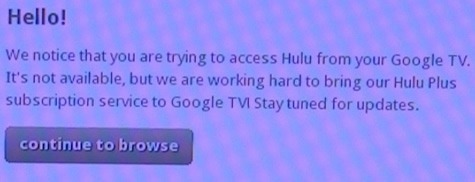
The biggest issue lies with the content providers. For example, even though the built-in web browser looks and feels just like a computer web browser, guess what happens when you go to Hulu.com? You’re greeted with this:
hulu

That’s certifiably insane considering you have a computer hooked up to your TV, except the computer says “Google TV” on it. It goes to show how much power these content companies have, though, and how crazy they start acting as people get closer and closer to connecting computers to their TVs.

The Big Picture

Google TV’s real potential competition comes from the likes of TiVo and Comcast since those companies’ boxes are input one devices. TiVo’s done an okay job of rounding out its internet-based video offerings, but it doesn’t have the web browser. Comcast has on-demand, but no networking features whatsoever. Verizon’s come the closest with its FiOS widgets and networking capabilities. Any of these companies could (and should) do what Google’s done, even if the end results are somewhat clunkier than Google TV at first.

I think the $300 price tag is going to scare a lot of consumers away unless they really get the idea of what’s being done here. Google would be wise to send a representative to every single Best Buy store in the country just to demonstrate how everything works. I don’t think Google’s marketed Google TV strongly enough and I don’t think it’s done enough to stress how the product is different from the sub-$100 streaming media boxes like Apple TV.

As a platform, everything works together relatively cohesively. The fusion of TV and the web is a weird thing to conceptualize, but Google’s done an admirable job of tying it all together and presenting it in an interface that isn’t too overwhelming. That being said, it’s still a geeky product. For a Google product, though, it’s already impressively polished. This isn’t something the company launched in beta with plans on updating it along the way. Updates will happen, sure, but it’s already a powerful technological showcase.

I showed Google TV to one of my normal, non-techie friends yesterday and he got exponentially more excited as I dug deeper into what can be done with it. He eventually stopped me and said, “This is all I want for Christmas.”

His thought was that he could cut the tie with Comcast this way, which is true to a certain extent. The real beauty of Google TV, though, is that you don’t have to cut the tie with your cable provider until you’re ready—or ever. It enhances how you currently watch TV while offering the same a la carte programming as competing TV boxes. And if there’s someone in your house that doesn’t want to have to re-learn a whole new TV system, they can keep watching TV as they normally do without Google TV interfering.

In that sense, it’s a bridge into the future of TV. It doesn’t assume that people want to get rid of their cable subscriptions all at once but if and when they do, it’ll act as a fine video-on-demand box with a full internet browser.

The world won’t end if you wait until less expensive devices hit the market. But if you happen to get a chance to try Google TV out in person and you really get into all it can do, it’s going to be hard to resist the purchase.

More on Techland:

Sony Unveils Internet Connected Google TV Products

Two Minute Video: The One Killer Feature of Google TV

More Google TV Details: Content Partnerships, Apps, and More

Related Topics: google tv, internet, logitech, logitech revue, reviews, Revue, Gadgets, Google, Home Entertainment, Reviews
  • njronbo

    The only…only problem with the video posted on this site….

    Doug shows us that he has a TIVO DVR and that he can Tivo
    shows on his Google TV if he wishes to.

    That’s great if he has a Tivo DVR with Dish Network.

    Any other DVR on any other network is not compatible.

    Otherwise, great review. I want one of these.

  • njronbo

    Bad news for Google TV:

    http://www.pcmag.com/article2/0,2817,2371266,00.asp

    Doesn’t look like a good buy after all.

  • http://www.aamoth.com/ Doug Aamoth

    I have a TiVo box and Comcast service (using a CableCard). I can record currently-playing shows using the Google TV interface, but scheduling future recordings has to be done directly through the TiVo interface. The Dish/Google TV box that’s coming out soon lets you schedule recordings directly through the Google TV interface.

    If I press the star/record button on the Google TV keyboard, it pops up a menu asking if I want to bookmark the channel or record the program. If I bookmark it, the channel gets added to the Bookmarks section in the Google TV menu. If I choose record, Google TV hands off the recording function to the TiVo box. Since the keyboard is a universal remote, it treats the record option the same as pressing the record button on the TiVo remote.

    As for that article you linked, yes, that’s not good at all. I’ll be doing a piece on that today.

  • http://smc62.wordpress.com/ smc62

    Doug,

    Does the box control the TiVo directly or am I gonna have to use the IR blaster? I hate that stuff, it’s old like fax.

  • http://www.aamoth.com/ Doug Aamoth

    @smc62

    Yes, the Logitech keyboard controls the TiVo box directly. No IR blaster required. Most relatively modern equipment shouldn’t need the IR blaster.

  • http://spirerphoto.wordpress.com realspear

    The way the Tivo remote control works with the Revue is that the keyboard talks RF to the Revue, which then sends out a massive IR blast that bounces off of everything and is picked up by the Tivo. In fact, there is IR blasting, just not from the keyboard.

  • http://mike87dish.wordpress.com mike87dish

    I’m proud to say I’m an owner of the Logitech Revue. As an employee of DISH Network I was able to play around with it a bit before it was launched and absolutely fell in love. So, naturally, when it launched I picked one up for the DISH Network price of $179 and haven’t looked back. The seamless experience with the full internet and access to my entire DISH DVR receiver have totally changed my TV experience. This is the future of TV, and it’s here now.

  • http://nopassivefool.wordpress.com nopassivefool

    Hooked everything up and started on screen setup. One of the first steps is to maximize the size of the viewing area, expanded to fill the screen as directed and completed setup. Booting up is SLOW…over 5 minutes! I then activated the internet and found that videos requiring a player will not work on this system. This was my reason for buying, to watch flash videos from a membership site on our home gym tv.

    TV does not work inside of the system so I changed the input back to “tv.” (This may be an issue with my TV model) Now the size of my viewing area for my tv has SHRUNK! Let me be clear…Revue setup directed me to ENLARGE viewing area inside of their setup. Now the area has SHRUNK when switched back to tv mode.

    This morning I called “support” about the issue. Rude Andrew told me that the Revue system had nothing to do with my tv screen resolution/size. I rebutted: YOUR setup system required that I make adjustments to the viewing area THROUGH your device. When I switch OFF of your system (and when I disconnect it entirely) the viewing area on my original system has shrunk and it has nothing to do with your system? Using the tv remote I ran through the tv’s screen modes, none of them fill the screen now.

    I then asked Andrew how to reset through the Revue. He says there is no way, agian arguing that Revue has nothing to do with it. Critical thinking engaged here? Obviously not. I ask for a supervisor and am told there is none. I ask for number to corporate and am told that he has no idea. Really?

    I look up corporate on the internet and ask for escalation (which Andrew SHOULD have engaged for me). No one knows how to fix the problems that their system caused. I was offered a refund, but waht about returning my tv to it’s original state?

    RUN FROM THIS PRODUCT! It was released far too early and “support” is ill-trained. Escalation noted that there are many problems and they just don’t know how to fix them. Be aware, any site that has videos that need a “player” on your computer WILL NOT WORK! It seems that “apps” are coming in a few months, but no one knows if a “player” will be included.

    So, who will pay a technician to come out and try to reset my tv screen viewing area?

blog comments powered by Disqus